

Maybe you found FeedSpot on a list of top blogs, saw it in search results, or heard about it from a colleague. Whatever brought you here, this guide explains what FeedSpot is, what people use it for, and how it works.
Table of Contents

1. What is FeedSpot?
2. Why Use a Content Reader?
3. How FeedSpot Works
4. What Makes FeedSpot Different?
5. Is FeedSpot Legit?
6. FeedSpot Plans
7. FAQs
1. What is FeedSpot?
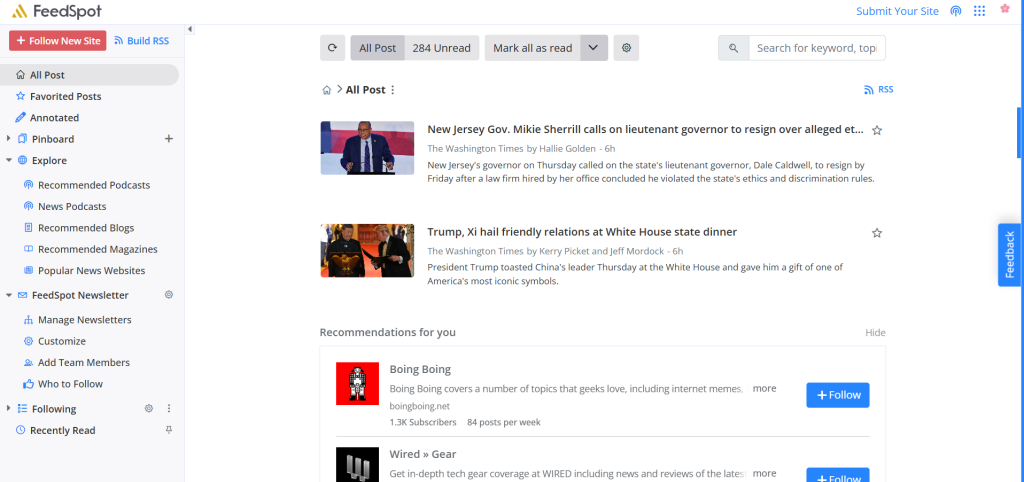
FeedSpot Reader is an RSS reader for the blogs, podcasts, news sites and YouTube channels you follow
FeedSpot Reader lets you add the blogs, podcasts, news sites, YouTube channels and RSS feeds you follow, and their new posts appear in one dashboard. It runs in your browser as well as an app on iOS and Android.
A catalog of sources to browse and follow
You don’t need to come prepared with a pre-made list of sources. FeedSpot Reader includes lists of blogs, podcasts, news sites, magazines and YouTube channels organized by topic, so you can browse a niche and follow what looks useful.
You can also check out this directory of popular podcast lists arranged alphabetically.
2. Why Use a Content Reader?
If you already know why you want one, skip ahead. If you’re not sure an RSS reader is worth adding to your routine, read on.
Every post on an RSS reader is only from the sources you choose
On social platforms and search engines, posts are ranked by engagement and your feed is influenced by the algorithm and trends. So an update from a blog you follow can turn up late or not at all when scrolling your Google Discover feed. Newsletters pile up unread in inboxes alongside other emails, and sites you used to check every day can slip your mind. Even with bookmarks, keeping track of everything gets messy.
An RSS reader works differently. You pick the blogs, news sites, podcasts and channels; and then add them into folders customized by you. Creating new lists for every niche or category of your interests helps keep your feed organized.
That helps when keeping up is part of your work, such as following industry news, competitor blogs or research. It works just as well for the blogs and shows you follow for fun.
AI can’t replace content readers
RSS is still how podcasts reach the apps that play them, and many newsletters and news sites still publish a feed. Google Reader shut down in 2013, but RSS carried on. Following sources directly through RSS means that you choose what you read, especially now when search results and social feeds are filling up with AI-generated content.
AI tools can summarize what you read, but they can only work with what they’re given. Someone still has to decide which sources deserve attention, and an RSS reader is where you make that decision.
3. How FeedSpot Works
People use FeedSpot Reader to follow the blogs, news sites, podcasts and YouTube channels they care about.
Some common use cases are:
- Professionals use FeedSpot’s News Website Database and Journalist Database to track industry news and research.
- Marketers use FeedSpot’s Blog Database and Magazine Database to watch trends and publications.
- Founders and investors use FeedSpot’s Blog Database and Podcast Database to keep an eye on startups and markets.
Regardless of your profession or interests, you can find multiple ways to use FeedSpot Reader to the fullest. Setting up takes just a few minutes.
You start by following a few sources
Sign up with Google, Apple or your email, then start your free trial. Add sources whichever way is easiest for you. You can either search for a site or topic with + Follow New Site, or browse Explore for recommended blogs, podcasts, magazines and news sites. If you’re moving over from another reader, import your existing feeds with the Import OPML feature instead of adding them one by one. 5-10 sources you already read is enough to begin with, and you can add more later.
Organize your feed with folders
Group sources into folders by topic, project or industry, such as a Machine Learning folder for everything you follow on that subject. You can read in the style of List View, Magazine View, Expanded View, and Card View.
Mark posts as read, star the ones you want to keep and save articles to pinboards. Search covers all your feeds, and you can send posts to apps like LinkedIn, Evernote, WordPress, and more.
The newsletter and apps bring the feed to you
If you’d rather read in your email inbox, the FeedSpot Newsletter emails a roundup of new posts as often as you choose: real-time, hourly, every 2, 6 or 12 hours, daily, weekly or twice a week; with twice a week being the default. On the Business plan, a team can share the newsletter so everyone conveniently gets the same industry news. The iOS and Android apps show the same feeds and folders as the desktop version in sync.
4. What Makes FeedSpot Different?
You can find new sources without leaving FeedSpot
FeedSpot’s own editorial team manually curates the topic lists of blogs, podcasts, magazines and news sites, covering over 750,000 sources across thousands of niches and continuously monitors the Explore feed. That means you don’t need to already know what you’re looking for or arrive with a pre-made list of feed URLs. Browse a topic, follow what looks good and it lands in your feed.
The FeedSpot team reviews sources before they’re listed
Before a source is listed, the FeedSpot team checks it for credibility, consistency and quality. The lists you browse are curated, not ranked by engagement.
FeedSpot has nine databases, each covering a different type of source
Six of them are lists you can follow in FeedSpot Reader: RSS feeds, blogs, podcasts, news websites, magazines and YouTube channels. The other three cover Instagram, X and TikTok influencers, which you can browse by niche. Together the lists cover more than 750K blogs, podcasts and influencers, and more than 120 million people have visited them.
| Database | Size | Browse by | Example lists | What you can do |
| RSS Database | 500K+ feeds | Topic, place or publisher | Best Sports RSS Feeds, HubSpot RSS Feeds | Subscribe to feeds. On the Business plan, combine them with RSS Combiner or show them on your site with RSS Widgets. |
| Blog Database | 250K+ bloggers | Topic or A to Z | Machine Learning Blogs, Personal Finance Blogs | Follow blogs. |
| Podcast Database | 3M+ active podcasts | Category, country, network, guest, talk show or audio drama | Funny Podcasts, Architecture Podcasts | Follow shows and play episodes. |
| News Website Database | 50K+ news websites | Topic, country, US state or language | HR News Websites, Tech News Websites | Follow news sites. |
| Magazine Database | 25K+ magazine editors | Topic or location | Interior Design Magazines, Sailing Magazines | Follow magazines. |
| YouTubers Database | 250K+ YouTubers | Topic, place, team or game | Faith YouTube Channels, Baking YouTube Channels | Follow channels. |
| Instagram Influencer Database | 500K+ active influencers | Niche, across 1,500+ categories | Home Improvement Influencers, UK Beauty Influencers | Browse the lists. Follow Instagram accounts on the Business plan. |
| Twitter Influencer Database | 100K+ active influencers | Niche, across 1,500+ categories | SEO Twitter Influencers, SaaS Twitter Influencers | Browse the lists. Follow X accounts on the Business plan. |
| TikTok Influencer Database | 100K+ active creators | Niche, across 1,500+ categories | Pickleball TikTok Influencers, STEM TikTok Influencers | Browse the lists. |
5. Is FeedSpot Legit?
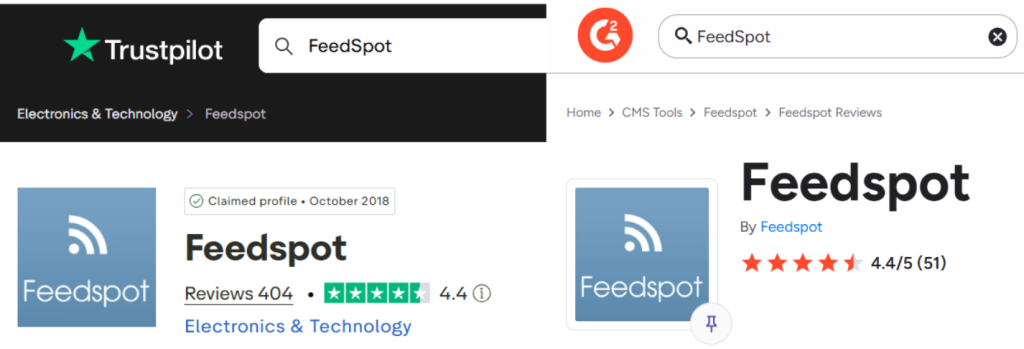
FeedSpot is rated 4.4 out of 5 on Trustpilot and G2
Yes. FeedSpot is a long-running platform with several products, iOS and Android apps, and card payments handled by Stripe and PayPal. Users have rated it 4.4 out of 5 on both Trustpilot (400+ reviews) and G2 (50+ reviews). You can check out more testimonials on the FeedSpot Reviews page.
Users say it makes keeping up with news and research easier
Debbie Friedman, who provides outsourced content marketing and copywriting for startups, says FeedSpot pulls content from many sources into one feed, which makes keeping up with her industry and doing research much easier.
Roger Walker, an environmental attorney in Columbia, Missouri, says it gives him confidence that he hasn’t missed anything important for his clients. He could probably find most of it himself, he adds, but his time is too valuable.
Annette Charlton, an editor in France, has been getting her favorite blog posts through FeedSpot for months and says it has made following the news much easier.
Some users rely on it for team updates and keyword alerts
David Staughton, a conference speaker and small-business growth expert in Melbourne, uses FeedSpot to monitor websites around the world, keep his team up to date and find ideas for new content. The news reaches each team member as daily or weekly emails, and he can trim it down to the most relevant information.
Terrence Branley, a co-founder in Meridian, Idaho, calls Brand Monitoring an excellent tool for keyword alerts and says it may replace Google Alerts for him.
Kourosh Maheri, a Linux engineer and consultant in San Diego, says he couldn’t get the news he wants for his trading without FeedSpot. Any keyword brings relevant news to the page, he can set up email options, and he finds it better than Twitter for instant updates from a specific market.
Reviewers also mention organized categories and helpful support
Annette Charlton found the live chat helpful and fast. On Trustpilot and G2, reviewers most often mention time saved; well-organized categories that are easy to browse; podcast, blog and influencer lists that help with outreach; and quick replies from customer support.
6. FeedSpot Plans
FeedSpot Reader has two plans, Basic and Business.You can head to the pricing page for a detailed comparison.
Basic covers personal reading and following
Basic plan lets you follow up to 500 sources, search across your feeds and get email alerts on a frequency of your choice, from real time to once a week. It also connects with apps such as LinkedIn, Buffer, Evernote, WordPress, OneNote and Instapaper.
Business adds tools for professionals and teams
Business plan includes everything in Basic, raises the limit to 5,000 sources and adds the following:
- Annotations and highlights on the articles you read.
- Following Instagram, X, LinkedIn, Facebook and Threads accounts alongside your other sources.
- Brand monitoring, which tracks mentions of your company, competitors, topics and keywords across the web.
- A social media scheduler for scheduling posts straight from the Reader or in the Scheduler tool.
- RSS Builder and RSS Generator, which create feeds from websites that don’t offer one and from social media profiles.
- Team sharing for the FeedSpot Newsletter.
7 Days Free Trial
Your card isn’t charged until the trial ends, and you can cancel from the billing page in your account before then. Use the week to follow a few sources and see which plan fits.
When you’re ready, start your 7-day free trial.
7. FAQs
What is FeedSpot?
FeedSpot is a content reader and discovery platform. Its main product is FeedSpot Reader, which lets you follow blogs, podcasts, news sites, YouTube channels and RSS feeds in one dashboard.
Is FeedSpot legit?
Yes. FeedSpot is a long-running platform rated 4.4 out of 5 on Trustpilot (400+ reviews) and on G2 (50+ reviews).
Is FeedSpot safe to use?
FeedSpot processes payments through Stripe and never stores your full card details. You can sign in with Google or Apple, and you can delete your account from your account settings at any time. For privacy or data requests, email [email protected].
Is FeedSpot free?
Both Basic and Business plans start with a 7-day free trial. Your card isn’t charged until the trial ends, and you can cancel from the billing page in your account before then. See the pricing page for current details.
Can I import my feeds from another RSS reader?
Yes. If you’re switching from another reader, you can import your existing feeds into FeedSpot Reader instead of adding each source again.
Does FeedSpot have a mobile app?
Yes. FeedSpot Reader is available for iOS on the App Store and for Android on Google Play.
Where can I get help?
Browse the help docs or email [email protected].
Keep Reading
For a walkthrough of every feature and setting, read the complete FeedSpot guide. If you’re comparing options, see how FeedSpot’s approach differs from other content readers.